


Prism: AI Quick Path Browser
4.4592.00 Reviews
App Specs
- Version
- 1.0.14
- Updated On
- License
- Free
- Downloads
- 1,000,000+
- Developer
- James c. Ross
- Categories
- Tools
- Platform
- Android
Screenshots






 Analysis by AppCompare
On a shared tablet, a browser can become a small household crossroads: one person checks a recipe, another looks up a school-related page, and someone else returns to a site they use every day. That is the kind of routine where Prism: AI Quick Path Browser sounds appealing. Its focus is getting people to familiar destinations quickly, rather than turning browsing into a project of managing a long list of tools.
I would treat it as a browser to try for everyday web access, not as a complete household organizer. A shared device still needs clear habits around who is using it and which account is signed in. Quick access can make a browser feel convenient, but it does not replace those boundaries or make one person’s browsing automatically separate from another’s.
A shared screen calls for simple habits
Imagine you are cooking dinner and want to reopen a recipe while another person needs to check a delivery update. A browser that helps surface familiar destinations may reduce the repeated typing and searching in that moment. The practical benefit is modest but useful: less time getting to the page, more time doing the task you picked up the device for.
That convenience works best when the people sharing the device already know how they handle accounts and browsing history. I would avoid assuming that a quick-path browser creates separate spaces for household members. Before someone else uses the device, check which account is active and close pages that contain personal information. Those are sensible browser habits regardless of which app you choose.
Set expectations before relying on suggestions
Prism is a free tools app from developer James c. Ross, and its central idea is a browser that can make repeat visits feel more direct. I like that premise for someone who revisits the same handful of pages, but suggestions become useful only when they match the way that person browses. On a shared device, different people may have very different routines, so a shortcut that helps one person may be irrelevant to the next.
For that reason, I would begin with ordinary, low-stakes browsing and see whether the suggested paths fit. Do not make a prediction feature the only route to an important page; keeping a site’s name or a bookmark accessible gives you a fallback if the browser has not yet learned the pattern you expect. This is especially helpful when a page is needed quickly and the device has recently been used by someone else.
Coordination without pretending it is a family-control tool
A useful way to share a browser is to agree on a simple handoff: finish the task, close any private pages, and let the next person search for what they need rather than relying on your suggestions. That small routine avoids treating a browser’s personalized navigation as a shared household schedule. It also keeps expectations realistic: Prism is for web browsing, not a substitute for a calendar, family account system, or parental-control setup.
Worth Reading Before You Choose

EA SPORTS FC Mobile 26 Is a Bigger Football Game, but It Takes Time

Flipboard Shows What News Apps Must Do Beyond the Feed

Switching to Android Auto Means Rethinking Your Driving Routine

Google Calendar Makes a Crowded Week Easier to Manage

Ludo King Makes the Most of the Minutes Between Plans

Baby Panda World Brings Quick Play to Modern Phones, but Its Game Library Feels Busy
If several people use one device, I would also be cautious about letting convenience blur account boundaries. A page that opens quickly may still be signed in to the previous user’s service. Check the account before submitting forms, changing settings, or making a purchase. This is not a special drawback unique to Prism; it is an everyday risk whenever a browser changes hands.
Age, trust, and the right level of supervision
The app is rated Everyone, which makes its age label broad, but that is not the same as a promise that every website reached through a browser is suitable for every child. If a young person uses the device, I would make decisions based on the websites they visit and the device’s existing supervision arrangements, rather than relying on the browser’s rating alone.
I also prefer to judge privacy by the controls and explanations I can actually review, rather than by reassuring language. When using any browser for personal accounts, it is sensible to inspect its settings, understand what is saved on the device, and avoid leaving sensitive pages open for the next person. That kind of check matters more in a shared household than a polished home screen does.
Who may appreciate this approach
Prism is most promising for someone who browses repeatedly for a few familiar tasks: checking the same information, returning to regular reading, or moving between a small set of everyday sites. It may also suit a person who finds a crowded browser distracting and prefers a straightforward starting point. Its 4.4 average from around 7,400 ratings, alongside more than a million installs, suggests that plenty of people have tried it, though those figures cannot tell you whether its navigation will match your habits.
I would look elsewhere if you depend on a large extension collection, highly developed multi-profile workflows, or a browser setup that must keep several people’s sessions clearly separated. The original appeal here is a simpler route through familiar browsing, not an exhaustive set of specialist tools. If your current browser already handles your tabs, accounts, and add-ons exactly as you want, switching may bring little benefit.
What's the Deal with Prism?
Picture this: a browser that not only helps you surf the net but also learns your habits and preferences. That's what Prism: AI Quick Path Browser aims to do. It's like having a personal assistant for your browsing needs. The app uses AI to predict where you want to go next, making your web journey smoother and faster.
Features That Stand Out
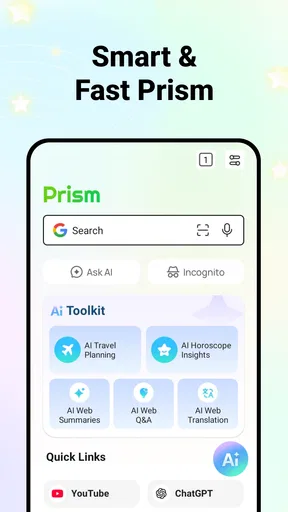
Let’s dive into some of the standout features. First up, the AI-driven navigation. This is where the magic happens. The browser learns from your browsing patterns and suggests quick paths to the sites you visit most. It’s like having shortcuts to your favorite websites, but smarter.
Then there’s the intuitive interface. Navigating through Prism feels like a breeze. The design is minimalistic, which I appreciate because it doesn’t get in the way of what you’re trying to do. No unnecessary buttons cluttering the screen – just pure, unadulterated web browsing.
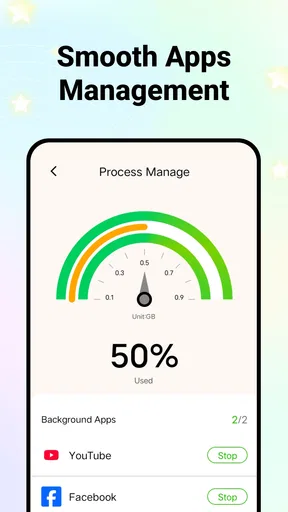
The tab management feature is another lifesaver. We’ve all been guilty of opening too many tabs, only to lose track of what’s where. Prism helps you manage your tabs efficiently, grouping them based on your browsing habits and making it easier to find what you need.
Why You Should Consider It
Alright, so why should you give Prism a shot? If you’re someone who spends a lot of time online, whether for work or leisure, this app could save you a ton of time. The AI predictions are surprisingly accurate, and they really do help cut down on the time you spend searching for your usual sites.
Another thing to love is the customization options. You can tailor the app to suit your needs, adjusting everything from the layout to the search engine. This level of personalization is something that really sets Prism apart from other browsers.
Not to mention, the privacy features are solid. We’re all a bit wary of what happens to our data these days, right? Prism reassures users with its commitment to privacy, so you can browse with peace of mind.
Room for Improvement?
Of course, no app is perfect. While the AI features are great, they might take a little while to adjust to your habits. It’s like training a new pet – you’ve got to give it some time to learn and adapt.
Also, if you’re a fan of add-ons and extensions, you might find Prism a bit lacking in that department. The app focuses on core functionality, so there aren’t a ton of bells and whistles compared to some other browsers out there.
Checking fit before making it the household default
For a fair trial, I would use the browser for a few distinct routines rather than judging it after one search. Try returning to a frequently visited page, opening several unrelated pages during a single task, and handing the device to another user afterward. That gives you a better sense of whether its suggested paths and tab organization help in practice, or whether they make more sense for one person than a shared household.
Version 1.0.14 is the current release, and the app is free. It supports Android 7.0 and later, so an older compatible Android device may still be an option for a household browsing screen. Prism is also described as available on iOS, but I would check the relevant store for the version and device requirements that apply to your own phone or tablet before planning a switch.
One useful trade-off to watch is the difference between a shortcut and a reliable record. A suggested route can speed up a repeat visit, while a bookmark or a note kept in the way your household already uses can be easier to understand when someone else takes over. For shared tasks—such as finding a school page or a recipe—say the site name out loud or leave a clear handoff, rather than assuming another person will see the same browser suggestions.
Everyday browsing versus specialist setups
Compared with a conventional browser built around a familiar address bar, bookmarks, and manual tab switching, Prism’s distinctive promise is that it can use browsing patterns to suggest a quicker route. That is a meaningful difference only if you welcome those suggestions. Someone who prefers to choose every destination deliberately may find a standard browser more predictable, while a person who repeats the same online routines may appreciate having the browser anticipate the next step.
It is also a different proposition from browsers chosen mainly for extension ecosystems or tightly separated work and personal profiles. Prism’s appeal is a lighter-feeling path to common browsing, while those alternatives can be better when add-ons, account separation, or an established workflow matter more than quick suggestions. I would not switch away from a setup that already solves those needs just to try a new navigation style.
What I would check during the first sessions
First, notice whether the suggested destinations are genuinely useful or simply add another choice to the screen. If a prediction is wrong, use the normal search or address route and continue; a helpful browser should not make you feel obliged to follow its recommendations. Give repeated habits time to become visible, but do not keep using an awkward workflow just because the app may adapt later.
Second, test tab handling with a real task rather than opening pages at random. For example, when comparing a few options for a household purchase, keep the relevant pages together and see whether the grouping makes it easier to return to the right one. If the groupings do not reflect how you think about the task, that is a practical sign that a browser with more manual organization could suit you better.
Third, review the settings that affect your routine before making Prism the default browser. Since layout and search engine can be adjusted, those are sensible places to start: choose a search provider you are comfortable with and arrange the interface so common actions are easy to reach. I would make one change at a time, then use the browser normally, so it is clear whether the adjustment actually helps.
When the convenience is not worth the compromise
Predictive navigation is not automatically an advantage for every kind of browsing. If you often visit one-off links, handle sensitive work, or move among accounts that must stay distinct, a more manual browser or a setup designed around separate profiles may be a safer fit for your routine. Likewise, someone who relies on extensions should treat the limited add-on choice as a real reason to stay with another browser, not a minor detail to ignore.
There is a learning curve in the other direction, too: you may need to let your routine settle before suggestions feel relevant, and changing a browser means rebuilding familiar habits. The clean interface can feel refreshingly uncluttered, but people who want visible controls and extensive customization may read that simplicity as a lack of flexibility. I would choose based on the tasks you do daily, not on the promise of AI alone.
The household verdict
Prism is a reasonable candidate for a personal or shared device when the main goal is straightforward access to recurring web destinations. Its no-cost entry point makes it easy to test, and its Everyone age label is broad; still, a browser’s label does not replace adult judgment about sites, account use, or the level of supervision a child needs. In a household, I would make it a shared option only after agreeing on sign-in and handoff habits.
My recommendation is to try it if you want a clean browser that may shorten familiar journeys and you do not depend on a deep extension library. Keep another browser in mind if separation between users, advanced add-ons, or precise manual control is essential. That is the fairest way to judge whether Prism fits: not by expecting it to manage a household, but by seeing whether its quicker routes make the web feel easier for the people who actually use the device.
The Final Verdict
So, is Prism: AI Quick Path Browser worth a download? If you’re looking for a browser that learns from you and makes your online journey quicker and more intuitive, then absolutely. Its AI-driven features and clean interface make it a strong contender in the browser world.
Give it a try, and who knows, it might just become your go-to browsing tool. You can find it on both Android and iOS, so there’s no excuse not to check it out. Happy browsing!
Pros
- Fast and intuitive interface
- AI-enhanced browsing experience
- Customizable themes
- Efficient data management
- Seamless multitasking support
Cons
- Limited offline features
- Occasional AI errors
- High battery consumption
- Requires stable internet
- Frequent ad pop-ups
FAQs for Prism: AI Quick Path Browser
What is Prism: AI Quick Path Browser?
Prism: AI Quick Path Browser is a cutting-edge web browser designed to enhance your online experience with AI-driven features. It offers fast browsing speeds, intuitive navigation, and personalized content recommendations. The browser’s AI technology ensures efficient performance and adapts to your browsing habits for a seamless experience.
Is Prism: AI Quick Path Browser available for both Android and iOS?
Yes, Prism: AI Quick Path Browser is available for download on both Android and iOS platforms. You can easily find it on the Google Play Store for Android devices and the Apple App Store for iOS devices. This cross-platform availability ensures that users can enjoy its features regardless of their device.
What unique features does Prism: AI Quick Path Browser offer?
Prism: AI Quick Path Browser stands out with its AI-powered features that include personalized content suggestions, smart ad blocking, and enhanced privacy settings. The browser also supports voice search and quick navigation shortcuts. These features work together to provide a more efficient, secure, and enjoyable browsing experience.
How does Prism: AI Quick Path Browser protect user privacy?
Prism: AI Quick Path Browser is designed with user privacy in mind. It includes advanced tracking protection, ensuring that your browsing data is not shared with third parties. The browser also offers a private browsing mode, allowing you to surf the web without leaving a trace. Its robust security measures help maintain your privacy online.
Are there any costs associated with using Prism: AI Quick Path Browser?
Prism: AI Quick Path Browser is free to download and use. However, there may be optional in-app purchases for enhanced features or services. These purchases are not necessary for enjoying the basic functionalities of the browser, ensuring that all users have access to its core features without any cost.


